Best Prebuilt Gaming PC Under or at $1000: Top Tested Picks & Buyer’s Guide
Finding the sweet spot between entry-level affordability and reliable frame rates is tough when shopping for a desktop on a tight budget. Sub-$1,000 gaming desktops deliver fluid 1080p competitive play and competent 1440p rasterization if you know which spec traps to avoid. If you want to jump straight to our curated hardware rankings across all price tiers, check out our roundup of the best prebuilt gaming PCs currently on the market.
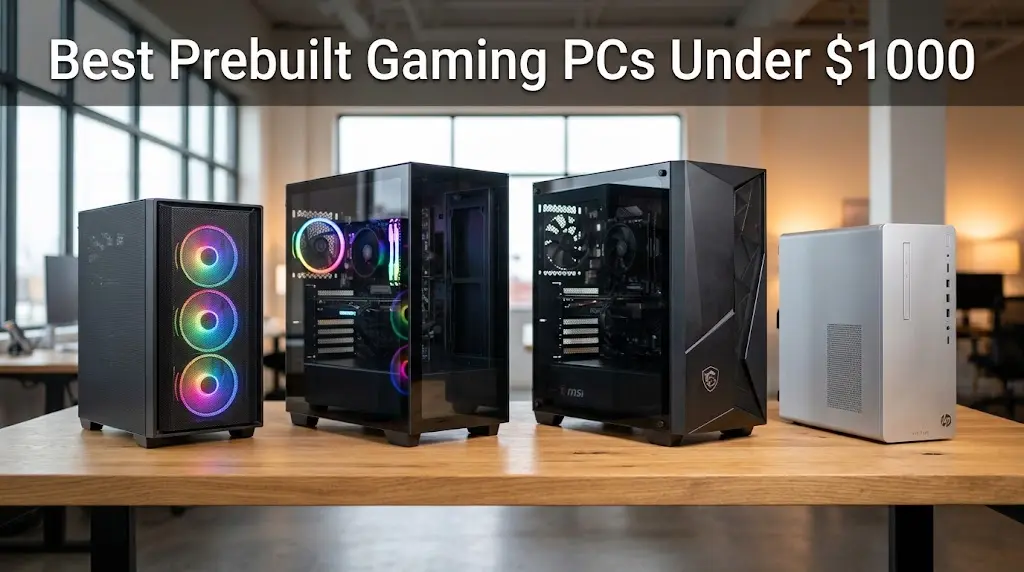
Best Prebuilt Gaming PC Under $1000
- Best Overall Value: Skytech Nebula (Core i5-13400F / RTX 4060) – Balanced 1080p performance, open front-mesh thermals, and standard mATX upgradeability.
- Best for Multitasking & Streaming: CyberPowerPC Gamer Master (Ryzen 5 7600 / RTX 4060) – Modern AM5 platform with fast single-core clocks and AV1 encoding.
- Best Premium Brand Quality: MSI Codex R2 (Core i5-14400F / RTX 4060) – High-phase motherboard VRMs, quiet acoustic fan curves, and clean cable routing.
- Best Ultra-Budget Pick: HP Victus 15L (Ryzen 5 5600G / AMD RX6400) – Sits well below the $800 threshold for pure out-of-the-box plug-and-play gaming.
How Fast Is a $1,000 prebuilt Gaming PC?
At the $1,000 threshold, your graphics baseline centers around the NVIDIA GeForce RTX 4060 8GB or AMD Radeon RX 7600 XT.
- 1080p Ultra Gaming: High-refresh frame rates in competitive esports (Valorant, Apex Legends, Counter-Strike 2) effortlessly push 180+ FPS, while modern AAA titles (Cyberpunk 2077, Black Myth: Wukong) run smoothly at 70–90 FPS on High settings.
- 1440p Viability: Powered by DLSS 3 Frame Generation or AMD FSR, an entry rig handles 1440p at 60 FPS in most narrative titles, provided you manage texture settings to fit within the 8GB VRAM envelope.
How I Selected These Budget Prebuilt PCs
Every budget rig was filtered against real-world performance benchmarks and long-term serviceability:
- Dedicated GPU Baseline: Minimum RTX 4060 or RX 7600 (no integrated graphics or outdated GTX 1650s).
- Motherboard Form Factor: Prioritizing standard mATX or ATX designs over glued or proprietary custom OEM boards.
- Dual-Channel Memory: Must ship with 16GB dual-channel (2x8GB) or easily upgradeable slots.
- Thermal Intake: Front mesh or vented side panels that prevent internal heat traps.
Best Prebuilt Gaming PCs Under $1000 at a Glance
Skytech Nebula
Brand: Skytech GamingCyberPowerPC Gamer Master
Brand: CyberPowerPCMSI Codex R2
Brand: MSIHP Victus 15L
Brand: HPBest Overall Prebuilt Gaming PC Under or at $1000 – Skytech Nebula (Core i5-13400F + RTX 4060)
Why I Choose Skytech Nebula 4060
The Skytech Nebula avoids the proprietary traps common to budget desktops. Pairing a 10-core Intel Core i5-13400F with an RTX 4060, it delivers consistent frame rates in 1080p and 1440p gaming. It features an open front-mesh panel with triple ARGB intake fans, keeping graphics temperatures well within safe limits without excessive acoustic drone.
Pros and Cons
- Pros:
- 100% off-the-shelf standard mATX chassis and motherboard.
- High-flow front mesh panel delivers lower component thermals.
- Efficient 600W 80-Plus Gold power supply.
- Cons:
- Uses DDR4 memory instead of DDR5 to keep costs down.
- Basic bundled keyboard and mouse.
Skytech Nebula 4060 Desktop Specs
- Specs: Intel Core i5-13400F, NVIDIA GeForce RTX 4060 8GB, 16GB DDR4 3200MHz, 1TB NVMe M.2 SSD, 4x ARGB Fans, 600W 80-Plus Gold PSU, Windows 11 Home.
Best AMD Platform Pick – CyberPowerPC Gamer Master (Ryzen 5 7600 + RTX 4060)
Why I Choose CyberPowerPC Gamer Master
The CyberPowerPC Gamer Master stands out by using AMD’s newer AM5 socket. The Ryzen 5 7600 processor offers fast single-core speeds and unlocks full DDR5 memory bandwidth. This configuration provides a clear CPU upgrade path down the line without forcing a full motherboard swap.
Pros and Cons
- Pros:
- AM5 motherboard platform ensures long-term CPU upgrade paths.
- DDR5 memory support out of the box.
- Dual-chamber case design showcases internal lighting neatly.
- Cons:
- Factory fan curves can sound loud under prolonged gaming loads.
- Internal cable routing varies slightly across manufacturing batches.
CyberPowerPC Gamer Master Specs
- Specs: AMD Ryzen 5 7600, NVIDIA GeForce RTX 4060 8GB, 16GB DDR5 5600MHz, 1TB PCIe NVMe SSD, Tempered Glass Mid-Tower, 600W Power Supply, Windows 11 Home.
Best Component Quality – MSI Codex R2 (Core i5-14400F + RTX 4060)
Why I Choose MSI Codex R2 Prebuilt Gaming Pc
When you push your budget close to the $1,000 ceiling, the MSI Codex R2 provides better internal craftsmanship. Built with an MSI PRO series motherboard, branded low-noise fans, and a high-efficiency power supply, it feels closer to a DIY PC than a mass-market budget build.
Pros and Cons
- Pros:
- Name-brand MSI cooling, chassis, and motherboard components.
- Intel 14th Gen architecture with 10 hybrid processing cores.
- Clean internal wire management and accessible expansion slots.
- Cons:
- Sits right at the $950–$1,000 price ceiling.
- Heavy steel side panels add noticeable desk weight.
MSI – Codex R2 Gaming Desktop Specs
- Specs: Intel Core i5-14400F, NVIDIA GeForce RTX 4060 8GB, 16GB DDR5 RAM, 1TB M.2 NVMe SSD, High-Airflow Mesh Front, 650W 80-Plus Power Supply, Windows 11 Home.
Best Compact Budget Pick – HP Victus 15L (Ryzen 5 5600G + RTX 4060)
Why I Choose HP – Victus 15L Gaming Desktop
If keeping your total cost well below $800 is your primary goal, the HP Victus 15L delivers pure frames-per-dollar. While it makes compromises on upgradeability, it delivers nearly identical gaming frame rates to pricier rigs because the RTX 4060 GPU runs at full power.
Pros and Cons
- Pros:
- One of the lowest-priced prebuilts with an RTX 4060.
- Compact footprint fits easily on smaller desks.
- Clean, understated office-friendly chassis design.
- Cons:
- Proprietary motherboard and power supply limit component upgrades.
- Smaller 512GB SSD fills up quickly with modern game installs.
HP Victus 15L Specs
- Specs: AMD Ryzen 5 5600G, NVIDIA GeForce RTX 4060 8GB, 16GB DDR4 RAM, 512GB PCIe NVMe SSD, Compact Vented Chassis, 500W Bronze PSU, Windows 11 Home.
Choosing the Right Configuration Under $1000
Gaming First
Focus on GPU allocation. Pair an RTX 4060 with a solid 6-core processor like the Ryzen 5 5600 or Core i5-13400F. This delivers steady 1080p high-refresh gaming in competitive titles and reliable 60 FPS in story-driven releases.
Gaming and Content Creation
Choose an Intel Core i5-13400F or i5-14400F. Intel’s performance and efficiency core architecture, combined with NVIDIA NVENC AV1 video encoders, lets you stream to Twitch or edit YouTube Shorts in Premiere without stuttering.
Looking for an Upgrade Path?
Prioritize AMD’s AM5 socket (Ryzen 7000/8000 series) and systems that use standard mATX motherboards. This ensures you can upgrade to an X3D gaming CPU or faster GPU down the line without replacing the entire computer.
Frequently Asked Questions
The Skytech Nebula offers the best overall balance. It pairs an Intel Core i5-13400F with an RTX 4060, uses standard components, and has an airflow-optimized mesh front panel that avoids thermal throttling.
Yes. Systems with an RTX 4060 or RX 7600 XT run most modern titles at 1440p using medium-to-high settings. Leveraging DLSS or FSR upscaling helps maintain smooth 60+ FPS in graphically demanding games.
Yes, 16GB (in a dual-channel 2x8GB setup) is the standard baseline for 1080p and entry 1440p gaming. Make sure your system has two open memory slots so you can easily upgrade to 32GB later.
Avoid systems using old GTX 1650/1660 graphics cards, single-channel RAM (a single 8GB or 16GB stick), mechanical hard drives as boot storage, or solid sealed front panels with no intake ventilation.